
Receive votes by messenger
Published: 21 August 2026
Voting by messenger from abroad is uncommon, but you must still be able to receive a vote by messenger if necessary. Verify the messenger’s identity, check the outer envelope carefully, and follow all the steps in the vote registration and processing procedure.
Who is permitted to vote by messenger?
A voter who is unable to come to the voting location in person due to disability, illness or old age can vote by messenger.
The voter can prepare their vote by messenger no earlier than 24 days before election day. A messenger can then hand in their vote.
Suggest postal voting as another option
If a voter is unable to come to the voting reception abroad, recommend postal voting as the preferred option.
Special materials for voting by messenger
Voting by messenger requires special materials provided by the Swedish Election Authority.
These include:
- an instruction sheet
- blank ballot papers
- ballot envelopes
- an outer envelope for voting by messenger.
Receiving a vote by messenger
Verify the messenger’s identity
Check the messenger’s ID and check off the vote in the voter list as you would for the voter.
If the messenger does not have an ID, they can still hand in the vote, provided that:
- they are known to someone in the voting reception (this person must be able to confirm the messenger’s identity and show their own ID)
- a member of the polling staff can confirm the messenger’s identity.
Note in the voter list how the messenger’s identity was verified.
Check the outer envelope
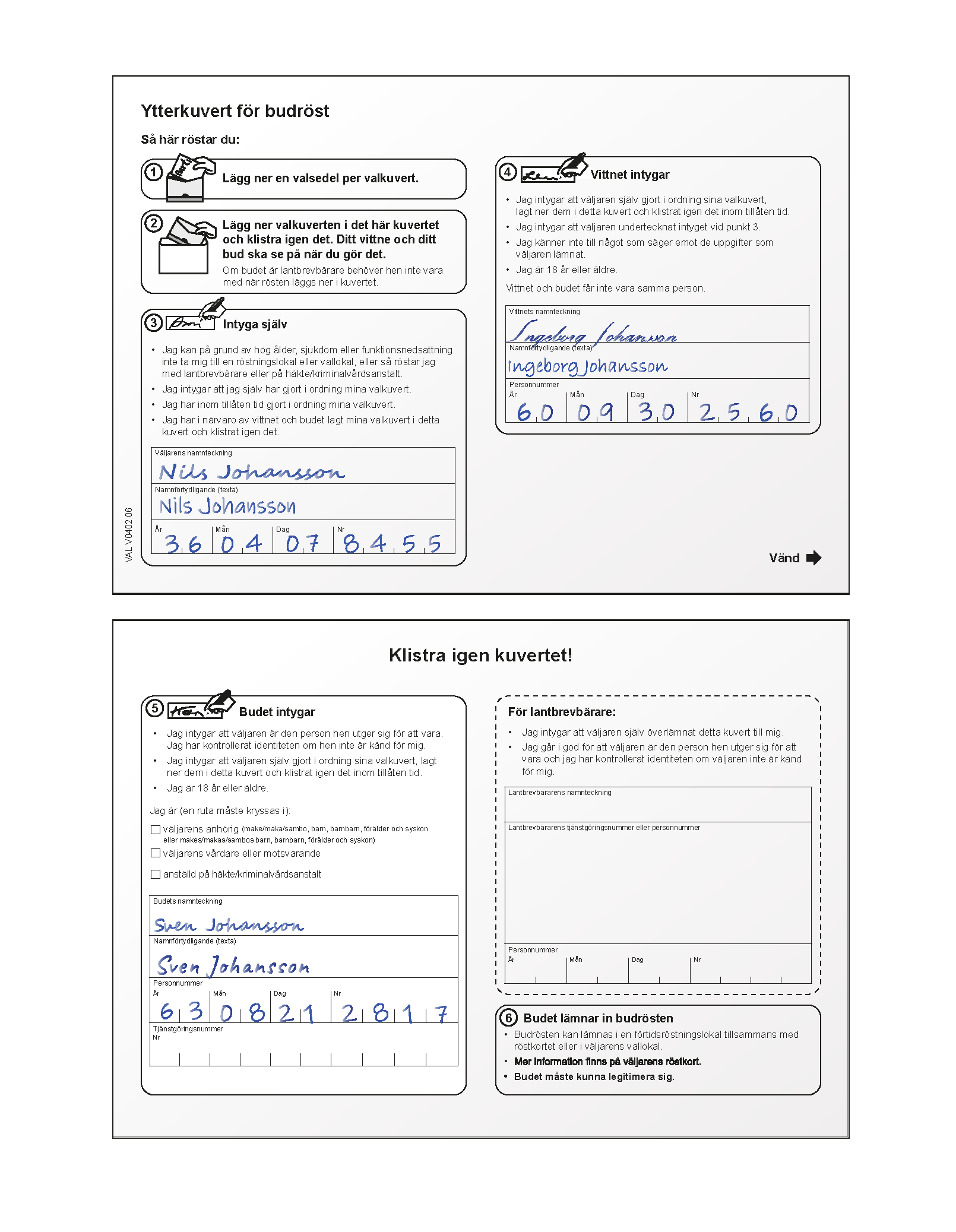
Check that the outer envelope has been prepared correctly, ensuring that:
- it is sealed and does not appear to have been opened since being sealed
- the voter has filled in their name and personal identity number
- the witness has filled in their name and personal identity number
- the witness is at least 18 years old
- the messenger and the witness are two different people
- the messenger has filled in their details on the back of the envelope (they can do this when handing in the vote)
- the messenger is at least 18 years old
You must not open the envelope!
Image of the front and back of an outer envelope for a vote by messenger, with filled-in details
If you cannot approve a vote by messenger
Do not return the outer envelope to the messenger. Instead, provide them with a new set of materials for voting by messenger. Record in the daily report that you have returned an incorrectly prepared vote by messenger.
Print out a duplicate voting card
Print out a duplicate voting card from Valid (enter the voter’s personal identity number as stated on the outer envelope).
If you cannot print out a duplicate voting card, and the messenger does not have the voter’s voting card, use an address card instead.
Fill in the necessary details on the voter list
You must enter the following:
- voter’s name as stated on the outer envelope
- the voter’s electoral roll number (or personal identity number if you use an expatriate voting card or address card)
- the polling staff member’s initials
- the current date
Put the outer envelope in a window envelope
- Put the voting card or address card into a window envelope, along with the sealed outer envelope for voting by messenger.
- Remove the self-adhesive label with a serial number, which is next to the voter’s name on the voter list, and stick it onto the back of the window envelope, on the flap.
Seal the window envelope and place it in the ballot box
- Seal the window envelope properly.
- Place the envelope in the ballot box.
Verifying a voter’s digital ID
Voters can use the Swedish digital ID cards Bank-id and Freja e-id+ to identify themselves. You must, however, verify a voter’s digital ID before accepting it.
Use a mobile phone with the Bank-id and Freja apps installed. You don’t need to activate the apps in order to carry out this verification; you just download them. You are not required to use any personal codes when verifying someone’s digital ID, and no voter details are saved to your phone. Freja e-id+ can also be verified using a web browser.
As a polling staff member, you’re responsible for determining whether a voter’s identity has been verified. If it’s not possible to verify their digital ID, you must ask them to provide another form of ID.
How to verify a voter’s digital ID
Here’s how to verify a voter’s Bank-id or Freja e-id+ digital ID card:
Bank-id
- Open the Bank-id app on your mobile phone.
- Tap “Scan QR code”.
- Scan the digital ID card displayed on the voter’s phone.
- If the voter’s ID is valid, an image will be displayed with a photo, name and personal identity number matching those on the voter’s digital ID card.
Freja e-id+ using the app
- Open the Freja app on your mobile phone.
- Tap “Scan” and scan the digital ID card displayed on the voter’s phone.
- If the voter’s ID is valid, a code will be displayed. The voter should also see the same code on their screen. Check that the codes match.
Freja e-id+ using a web browser
- Open your web browser and go to the Freja verification portal: kontroll.frejaeid.com.
- Enter the personal identity number stated on the voter’s digital ID card.
- If the voter’s ID is valid, a code will be displayed. The voter should also see the same code on their screen. Check that the codes match.